本 html 由 mdrise.skill 生成  ·  this page was generated by mdrise.skill

mdrise

让 Markdown 升维成可分享的 HTML · Elevate any Markdown into a shareable HTML.

背景:Markdown 真的要凉了吗?

2026 年初,Anthropic 工程师 Thariq 发了一篇长文《Using Claude Code: The Unreasonable Effectiveness of HTML》,全网炸了——929 评论、3.4K 转发、14K 赞、1000 万阅读:
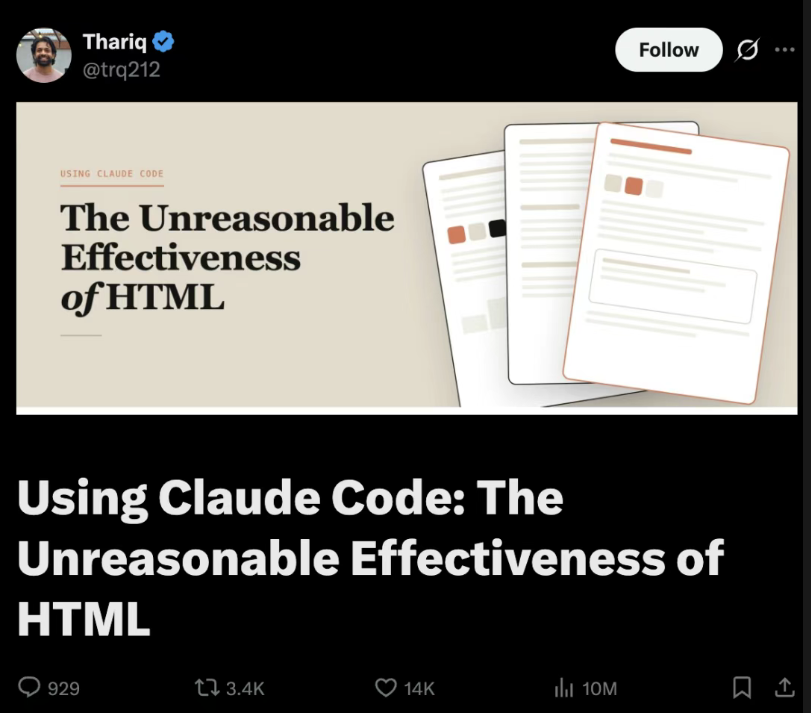
Thariq 原推:Using Claude Code — The Unreasonable Effectiveness of HTML

量子位翻成中文标题叫《Markdown 要凉…卡帕西也站 HTML 了》。核心论点:

我现在不管是做规划、需求设计、方案探索,还是代码审查和整理报告,全都在用 HTML。

文章列了五条 HTML > Markdown 的理由:信息密度、可读性、零成本分享、交互能力、快乐感。

但是 — Markdown 没死,只是退到了「源格式」

仔细看 Thariq 自己说的:"我几乎不亲手编辑这些文件了,更多是拿它们当规范、参考文档或者头脑风暴的产出。"

也就是说,AI 写的还是 Markdown人类要读的才是 HTML

Markdown 仍然有 5 个 HTML 替代不了的功能:

功能说明
Git diff行级 diff 干净可读;HTML 的标签噪音让 PR review 几乎不可能
可移植任何编辑器、任何系统、任何工具链都认
不污染 token喂给 LLM 时没有标签噪音,纯信息密度
Source of truth一份源,能导出 HTML / PDF / DOCX / PPTX 全套
Version control30 年的工具积累全部适用

所以 Markdown 的位置已经在变。未来 AI 系统的架构大概率是:

AI
 ↓
MD / JSON / AST          ← 源格式(Git 层)
 ↓
HTML Component Tree      ← 渲染层(人类阅读)
 ↓
人类阅读

Markdown 会逐渐退化成:

  • 导出格式 — 一份源可以导出多种成品
  • 兼容层 — 跟旧工具链握手
  • 纯文本 fallback — 没法渲染 HTML 时降级
  • Git 层 — 版本控制、diff、review

而不是主交互层。 主交互层是 HTML(甚至按 Karpathy 的说法,终点可能是某种直接生成的交互视频)。

HTML 自己的短板,恰好需要 MD 来补

文章评论区有人问:HTML 这么好,那版本控制怎么办?HTML 的 diff 是出了名的"吵"——一改动几行内容,标签、样式、属性的变化淹没掉真正的差异,让 PR review 几乎不可能。Thariq 自己也承认:这是 HTML 最大的短板,没有完美解决方案。

但其实有——只是答案不在 HTML 这一侧。

让 MD 留在 Git 里。HTML 只在需要给人看的时候按需生成。

.md  →  Git 仓库(version control / diff / review / source of truth)
 ↓ mdrise(按需)
.html  →  分享 / 阅读 / 邮件 / 打印(人类视觉成品)

这是 mdrise 设计上最关键的一点:你不需要在 "Markdown vs HTML" 里选边,而是让它们各干各的事——

  • MD 干 MD 擅长的:Git diff、可移植、不污染 token、source of truth、version control
  • HTML 干 HTML 擅长的:信息密度、可读性、零成本分享、交互、阅读快乐

mdrise 就是这两者中间那个自动桥:AI 写 .md 提交进 Git;需要给人看的时候,一句"做成网页"就生成 .html.html 是临时视觉成品——扔了再生,零成本。

这就是为什么"AI 时代是颠覆性的"——不是因为 Markdown 死了,而是因为它的角色从「人类的主要交互层」退回了「机器的源格式」。它仍然不可替代,只是位置变了。

这是什么

一个 Claude skill。装上之后,让 Claude 把任何 .md 转成单文件 HTML,具备:

  • 文字一字不改 — 不 paraphrase、不"修正"、不省略。源里有什么,HTML 里就有什么。
  • 视觉自动判断 — Claude 先识别内容媒介(文档 / 书页 / 落地页 / 笔记…),再 pick 字体、色板、版式。不是统一模板。
  • 侧边浮动目录 — 自动从 H2 / H3 生成,永久可见的展开图标随滚动跟着走,scroll-spy 高亮当前章节。
  • 17+ 种文字脚本支持 — 拉丁、中日韩、阿拉伯希伯来(RTL)、西里尔、印地、泰米尔、孟加拉、泰文、高棉、缅文、格鲁吉亚、亚美尼亚、埃塞俄比亚……每种都有字体推荐表,Noto 家族兜底。
  • 反 AI slop 三条铁律 — 禁用 Inter / Roboto / Arial、禁用紫渐变白底 hero、禁止把书页美学塞给非文学内容。
  • 单文件输出 — CSS 全内联,唯一外部资源是 Google Fonts CDN。一个 .html 文件,邮件附件就能传。

不重复劳动:源没变就不重渲

mdrise.md ↔ .html 当成一对镜像在维护,不是无脑触发。每次生成的 HTML 头部都会嵌入一段源文件的 SHA-256 指纹:

<meta name="mdrise-source-hash" content="sha256:9c01140d59119d59e0...">
<meta name="mdrise-generated-at" content="2026-05-12T09:08:27Z">

下次你(或 Claude 自己)想"做成网页"的时候,skill 先读现有 HTML 的 hash,跟当前 MD 算一遍 hash 对比,按这张表决定:

状态行为
.html 不存在直接生成
.html 存在,但 hash 跟源不匹配(MD 改过了)直接重渲 — 典型场景:AI 刚改完 README
.html 存在,hash 跟源一致(in sync)询问你 要不要重渲,不擅自动手
你说 "force / 重新生成"跳过检查直接重渲

这意味着 mdrise 可以被反复调用而不污染文件——每次对话只要提到 README,不会重复跑一遍 HTML 生成。这才是"自动维护 markdown→HTML 镜像"该有的样子。

为什么用 hash 不用文件 mtime:git clone 会把所有文件的 mtime 重置成 clone 时间,mtime 不可信。Hash 锚定的是源内容,跨 clone 跨设备都准。

实战示例(5个真实测试)

每个都跑了 with-skill 和 baseline(不装 skill 让 Claude 裸做)。点链接看实际渲染效果:

安装

Claude Code CLI

/plugin marketplace add YukiOvOb/mdrise
/reload-plugins

或者本地装:

claude --plugin-dir ./mdrise.skill

Claude 桌面 / 网页

mdrise.skill 文件传到 claude.ai 的 skills 上传入口。

使用

直接跟 Claude 说人话:

> 把 README.md 做成网页
> render this article as html
> 美化这篇文章
> turn my notes into a webpage
> 做个项目主页
> 排版一下这个 markdown

或者最自然的工作流:让 Claude 写完 plan.md / report.md 之后,跟一句"做成网页"。

工作目录里有 README.md 时,任何"做成网页 / 美化 / 做个主页"类的请求会自动选这个 skill——这是写在 description 里的硬规则。

设计哲学

两个不可变约束:

  1. 文字一字不差——所有 enhancement 都是视觉层的加法,从不替换或重述源文字。
  2. 视觉必须升维——目标是"分得出去"的水平,不是 default browser rendering。

核心方法论:先判断媒介,再挑美学。

  • 文学 → 书页(米纸 + 衬线正文 + 古典分割符 + 窄栏)
  • 技术 → 文档站(Stripe / Vercel / Anthropic docs 调性,干净屏幕原生)
  • 产品 → 落地页(Linear / Resend 调性,现代设计感)
  • 这条边界是核心——书页美学给文学内容。技术 / 产品文档用了就是 category error。

多语言策略: 先识别脚本(CJK / 阿拉伯 / 西里尔 / 印地…),再挑字体覆盖(Noto 家族兜底),再判断方向(LTR / RTL)和布局。RTL 用逻辑 CSS(padding-inline-start 等)而不是 left / right

完整设计原则见 SKILL.md

贡献 & 反馈

欢迎 issue 和 PR。如果 mdrise 对你的某个特定内容类型不奏效,请:

  1. 发个 issue,贴上源 .md 和你期望的视觉方向
  2. 我会用同样的 4 步迭代法(draft skill → run subagents → review → revise)把它修进去

致谢 / 打赏

mdrise 完全开源(MIT)。如果它帮你省下了排版的时间,或者你想支持我继续打磨它,欢迎请我喝杯咖啡:

微信 / 支付宝 收款码./donation.png — 把微信 / 支付宝收款码二维码图片保存到这里

接受各种形式的支持:把 mdrise 转发给一个用 Claude 写 README 的朋友,给仓库点个 ⭐,或者用它做出来一份漂亮的 HTML 然后发给我看看——那就是最大的鼓励。

License

MIT。详见 LICENSE

Background — is Markdown really dying?

In early 2026, Anthropic engineer Thariq published an essay titled "Using Claude Code: The Unreasonable Effectiveness of HTML" that went viral — 929 comments, 3.4K retweets, 14K likes, 10M views:

Thariq's original tweet: Using Claude Code — The Unreasonable Effectiveness of HTML

The core claim:

Whether I'm planning, drafting specs, exploring solutions, reviewing code, or organizing reports — I now do all of it in HTML.

The essay lists five reasons HTML beats Markdown: density, readability, zero-friction sharing, interaction, and joy. Every one of them is true.

But — Markdown isn't dead. It just retreated to "source format."

Read what Thariq actually said: "I rarely hand-edit these files anymore — I use them as specs, reference docs, brainstorming output. If I need to change something, I usually just throw it at Claude."

In other words: AI still writes Markdown. Humans still read HTML.

Markdown retains five functions that HTML can't replace:

FunctionWhy it survives
Git diffLine-level diffs are clean and reviewable. HTML's tag noise makes PR review nearly impossible.
PortabilityEvery editor, every system, every toolchain understands it.
No token pollutionWhen fed to LLMs, no tag overhead — pure information density.
Source of truthOne source exports to HTML / PDF / DOCX / PPTX.
Version control30 years of accumulated tooling apply directly.

So Markdown's position is shifting. The likely future architecture of AI systems looks like this:

AI
 ↓
MD / JSON / AST          ← source format (Git layer)
 ↓
HTML Component Tree      ← render layer (human reading)
 ↓
Human reader

Markdown will gradually become:

  • An export format — one source, many downstream artifacts
  • A compatibility layer — shaking hands with older toolchains
  • A plain-text fallback — graceful degradation when HTML can't render
  • A Git layer — version control, diff, review

Not the primary interaction layer. That's HTML — and eventually, per Karpathy, perhaps some directly-generated interactive video.

HTML's weakness is exactly where MD fills the gap

Commenters on Thariq's essay asked the obvious question: HTML is great, but what about version control? HTML diffs are notoriously noisy — change a few lines of content, and the tag, style, and attribute churn drowns out the actual difference. PR review becomes nearly impossible. Thariq himself acknowledged: this is HTML's biggest weakness, with no perfect solution.

But there is a solution — it just isn't on the HTML side.

Keep MD in Git. Render HTML on demand, only when humans need to read it.

.md  →  Git repo (version control / diff / review / source of truth)
 ↓ mdrise (on demand)
.html  →  share / read / email / print (human visual artifact)

This is the most important point in mdrise's design. You don't have to pick a side in "Markdown vs HTML." You let each do what it does best:

  • MD does what MD does well: Git diff, portability, no token pollution, source of truth, version control
  • HTML does what HTML does well: information density, readability, zero-cost sharing, interaction, reading pleasure

mdrise is the automatic bridge between them: AI writes the .md and commits it to Git; when a human needs to read it, one "make it a webpage" produces the .html. The .html is a disposable visual artifact — regenerate any time, zero cost.

This is what makes the AI era genuinely disruptive — not that Markdown died, but that its role shifted from "primary interaction layer for humans" back to "source format for machines." It's still indispensable; the position just changed.

What this is

A Claude skill. Install it, then ask Claude to convert any .md into a single-file HTML that:

  • Preserves every word verbatim — no paraphrasing, no "fixing," no omission. What's in the source is in the HTML.
  • Auto-selects visual style — Claude first identifies the content's medium (docs / book page / landing / notebook…) then picks fonts, palette, layout. Not a uniform template.
  • Floats a side table-of-contents — auto-generated from H2 / H3, a persistent toggle stays visible as you scroll, scroll-spy highlights the current section.
  • Supports 17+ writing scripts — Latin, CJK, Arabic & Hebrew (RTL), Cyrillic, Devanagari, Tamil, Bengali, Thai, Khmer, Burmese, Georgian, Armenian, Ethiopic… each with a font recommendation table, with the Noto family as universal fallback.
  • Three anti-slop rules — no Inter / Roboto / Arial, no purple-gradient-on-white hero, no book-page aesthetics on non-literary content.
  • Single-file output — all CSS inlined, only external resource is Google Fonts. One .html file you can send as an email attachment.

Not just slapping marked.js + a default Bootstrap theme on it — that turns ugly markdown into ugly markdown rendered. The goal is for Claude to recognize what kind of document this is and pick a visual language that matches: a technical README gets Vercel / Stripe docs vibes, a personal essay gets a printed book page, a product launch gets a Linear-style landing page, an Arabic literary piece gets a right-to-left book page — all auto-decided.

No redundant work — only rerender when the source changed

mdrise treats .md ↔ .html as a maintained mirror pair, not a blind trigger. Each generated HTML embeds a SHA-256 fingerprint of the source in the head:

<meta name="mdrise-source-hash" content="sha256:9c01140d59119d59e0...">
<meta name="mdrise-generated-at" content="2026-05-12T09:08:27Z">

Next time you (or Claude) wants to "make it a webpage", the skill reads the hash from the existing HTML, computes a fresh hash of the current MD, and decides from this table:

StateBehavior
.html doesn't existGenerate immediately
.html exists but hash doesn't match (MD was edited)Regenerate — typical case: AI just modified README
.html exists and hash matches (in sync)Ask you before regenerating, don't act blindly
You say "force / 重新生成"Skip the check, always regenerate

This makes mdrise safely idempotent — invoke it as often as you want; it won't churn out a new HTML every conversation that happens to mention the README. That's what "automatic maintenance of a markdown→HTML mirror" actually means.

Why hash instead of file mtime: git clone resets every file's mtime to the clone moment, so mtime is unreliable. Hashes anchor to source content — consistent across clones and devices.

Real-world examples (5 test cases)

Each was rendered both with-skill and as a no-skill baseline. Click any link to see the actual rendered output:

ContentLanguageMediumWith mdriseBaseline
Lumie project audit report Chinese technical docs docs vibe, jade-teal, left-rail ToC purple aurora gradient + glass cards (AI default)
First year in a new city Chinese personal essay rice-paper + LXGW WenKai + ❖ + 「目」toggle OK-ish but no ToC
Glimpse JSON visualizer English product launch Linear-dark + Geist + electric lime dark + Inter + generic cards
鏡 Kagami SSG Japanese technical README Vercel / Linear dark + Noto Sans JP Noto Serif JP body + seal motif (book-trap)
Damascus morning coffee Arabic literary essay RTL + Amiri + Aref Ruqaa + mirrored ToC + diacritic verification RTL applied, fonts good, but no ToC, no Latin isolation

Install

Claude Code CLI

/plugin marketplace add YukiOvOb/mdrise
/reload-plugins

Or install locally:

claude --plugin-dir ./mdrise.skill

Claude desktop / web

Upload mdrise.skill via the skills uploader on claude.ai.

Use

Just talk to Claude:

> turn README.md into a webpage
> render this article as html
> make my notes look nice
> create a project homepage
> 做成网页
> 美化这篇文章

The most natural workflow: after Claude finishes writing a plan.md / report.md, just say "make it a webpage."

When README.md exists in the working directory, any "make it a webpage / homepage / look nice" request auto-routes to this skill — that's a hard rule baked into the skill description.

Design philosophy

Two invariants:

  1. Text fidelity — every visual enhancement is additive. Never replace or paraphrase source text.
  2. Visual elevation — target is "shareable" quality, not default browser rendering.

Core method: identify the medium first, then pick aesthetics.

  • Literary → book page (warm paper + serif body + classical dividers + narrow column)
  • Technical → docs site (Stripe / Vercel / Anthropic docs vibe — clean, screen-native)
  • Product → landing page (Linear / Resend vibe — modern, designed)
  • This boundary is central. Book-page aesthetics belong to literary content only. Using them on technical / product docs is a category error.

Multi-language strategy: identify script first (CJK / Arabic / Cyrillic / Devanagari…), pick fonts that cover it (Noto family as safe default), then handle direction (LTR / RTL) and layout. RTL uses logical CSS (padding-inline-start, etc.), not left / right.

Full design principles: see SKILL.md.

Contributing

Issues and PRs welcome. If mdrise fails on a content type you care about:

  1. Open an issue with the source .md and the visual direction you want
  2. I'll iterate on the skill using the same 4-step loop (draft → subagent runs → review → revise)

mdrise is fully open source (MIT). If it saved you time on layout, or you want to support continued polish, buy me a coffee:

WeChat / Alipay donation QR./donation.png — save your WeChat / Alipay QR image here

Any support welcome: share mdrise with someone who writes README files with Claude, star the repo, or render something beautiful with it and send me the result — that's the biggest encouragement.

License

MIT. See LICENSE.

"Markdown is dead." — Thariq, 2026 "Markdown isn't dead — it just finally found its right place." — mdrise